
A PLC never touches a sensor or a motor directly. Every signal that enters or leaves the control system passes through an I/O module first, which makes it one of the quietest, most essential components in the whole automation chain.
I/O modules rarely get the attention that PLCs, sensors, or drives receive, yet nothing in an automated system reaches the controller, or leaves it, without passing through one first.
I/O modules close the gap between the physical world of devices and the control systems that run an automated process. They connect sensors and actuators to a PLC, offering a direct path between machines and the logic that governs them, with the efficiency and safety the rest of the system depends on.
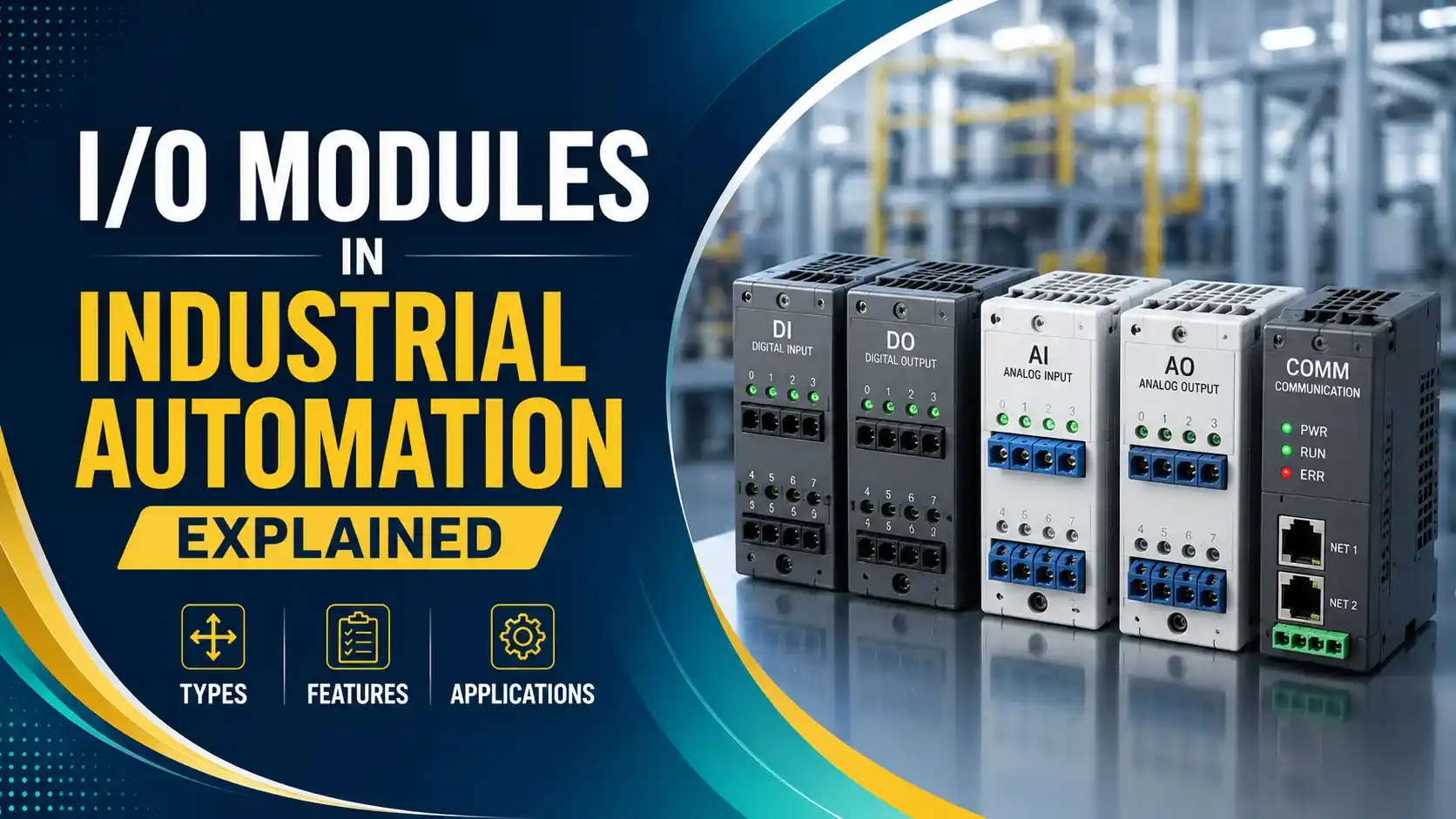
An I/O module transforms a raw sensor signal into something the control system can read, and it transforms a control decision back into a signal an actuator can act on. A high quality I/O module guarantees error free data transmission, high precision, and a short response time, and that reliability shows up directly as reduced downtime and higher productivity across the plant.
This guide covers what I/O modules actually are, the input and output types you will encounter, the key features that separate a well built module from a weak one, why they matter so much in practice, and a real world packaging line example that ties it all together.
What Are IO Modules
I/O modules connect physical devices, sensors and actuators, to control systems like PLCs. They transmit data from the real world into the control system so it can make decisions, then carry the resulting command back out to the field as an output signal.
Without I/O modules, a PLC would have no practical way to read a temperature sensor or switch on a motor. They are the translation layer that makes the entire relationship between field devices and control logic possible, and every signal path in an automated system ultimately runs through one.
In practice, most I/O modules live on a rack alongside the PLC's processor, each module handling a fixed number of input or output points. Larger systems chain multiple racks together, and the total count of available I/O points is often one of the first specifications an engineer checks when sizing a new control panel.
Types of I/O Modules
I/O modules fall into two broad categories, input modules and output modules, and each of those splits again into digital and analog versions.
Digital Input Modules
Read simple on or off signals, from switches, proximity sensors, or limit switches, telling the control system whether a device is active or inactive.
Analog Input Modules
Read continuously variable signals, voltage or current representing temperature, pressure, speed, or flow, and process them in real time.
Digital Output Modules
Send on or off commands to a relay, motor, or alarm, switching a device according to conditions defined in the control logic.
Analog Output Modules
Produce a continuous output signal, driving a variable speed drive, a flow regulator, or a temperature control loop with fine adjustment.
A digital I/O module only ever answers yes or no. An analog I/O module answers how much. Knowing which question your process is actually asking is the first step in specifying the right module.
Key Features of I/O Modules
Signal Conditioning
Amplifies weak signals, converts analog to digital, and filters out noise before processing.
Isolation
Electrical isolation keeps high voltages, surges, or ground faults away from sensitive equipment.
Communication Protocols
Support for Modbus, PROFIBUS, EtherCAT, or OPC keeps the module compatible with most control systems.
Real Time Monitoring
Live feedback on inputs and outputs makes faults and inefficiencies easy to catch quickly.
Modular Design
Expandable racks let a system add sensors or actuators without an overhaul.
Centralized vs Distributed I/O Architecture
Beyond the digital and analog distinction, I/O modules are also arranged differently depending on how a facility is laid out. This architectural choice affects wiring cost, response time, and how easy the system is to expand later.
Centralized I/O
All I/O modules sit in one rack alongside the PLC, with field wiring running back to that single location. This keeps the architecture simple and easy to troubleshoot from one place.
Distributed (Remote) I/O
I/O modules are spread across the facility, close to the sensors and actuators they serve, and communicate back to the main controller over a network. This cuts wiring runs dramatically on larger sites.
Centralized I/O tends to suit smaller machines or compact skids where every device sits close together anyway. Distributed I/O earns its keep on larger plants, where running a separate wire from every sensor back to one central cabinet would mean enormous cable costs and a much harder installation. Most modern industrial sites use a mix of both, centralizing I/O for a local machine while distributing it across a wider production line.
The tradeoff is that distributed I/O depends entirely on the communication network staying healthy. A network interruption between a remote I/O rack and the controller can look, from the process side, exactly like a bank of sensors going silent all at once, which is why network reliability becomes just as important as the I/O modules themselves in a distributed design.
Why I/O Modules Matter in Industrial Automation
Real Time Control
Field data has to reach the controller accurately and quickly enough for the system to respond correctly, whether that means monitoring machine health or adjusting a conveyor's speed on the fly. A delay of even a fraction of a second in that data path can mean the difference between a smooth adjustment and a missed product on a fast moving line.
Process Automation and Efficiency
Precise sensor data paired with reliable actuator feedback reduces the need for human intervention and cuts errors across the whole process. Over time, this is what actually lets a facility run leaner staffing on a shift without sacrificing throughput or quality.
Scalability
Modular I/O racks let a facility add sensors and actuators as complexity grows, without a major system overhaul or extended downtime. A line that starts with a handful of I/O points can grow into hundreds without ever needing to replace the underlying architecture.
Flexibility
Support for many signal types, protocols, and configurations means I/O modules work with nearly any device a system design calls for. This flexibility is exactly what lets an engineer mix decades old field devices with brand new smart sensors on the same rack.
Safety and Monitoring
Continuous data flowing back to the controller makes it possible to catch overheating, overpressure, or a malfunctioning device before it causes real damage. In many plants, this same data feed is what triggers an alarm on the HMI long before a human operator would notice anything wrong by eye.
Watch: What Are I/O Modules
This video from Galco covers the basics of I/O modules and how they connect to external loads like sensors and actuators.
Video: "What are I/O Modules? A Galco TV Tech Tip", via YouTube.
I/O Modules in Action: A Packaging Line Example
The Setup
An automated packaging line runs filling, labeling, sealing, and label application in sequence, each stage feeding data back to a central PLC. The whole line depends on I/O modules translating what is happening physically at each station into something the controller can act on within milliseconds.
Input Modules at Work
Temperature and pressure sensors monitor the filling process, with an analog input module interpreting the continuous flow and pressure signals coming off the fill head. If the fill pressure drifts outside its expected range, the analog input module reports that drift immediately, letting the PLC slow the line or trigger an alert before a single bottle is under filled. At the labeling station, proximity sensors confirm each label is correctly placed before the product advances, reporting back through a digital input module.
Output Modules at Work
A digital output module opens and closes the sealing mechanism the instant a sensor confirms a bottle is in position. Further down the line, digital output modules also drive the label applicators, timing each application to match the product's position exactly. None of these actions happen through a direct wire from sensor to actuator. Every one of them passes through the PLC's I/O modules first, which is what allows the whole sequence to be monitored, logged, and adjusted centrally.
Why It Works
Every stage depends on I/O modules translating a physical event into a signal the PLC can act on, and back again. That constant, accurate translation is what lets the whole line run with minimal human intervention and consistent quality, and it is exactly why a fault in a single I/O module can bring an entire packaging line to a stop until it is identified and replaced.
Common I/O Module Mistakes to Avoid
Most I/O related faults on a running system trace back to one of these avoidable mistakes made during specification or installation.
✔ Do
- Match the module type to the actual signal, digital for on/off, analog for continuous data
- Confirm isolation ratings before installing near high voltage or noisy equipment
- Choose modules that support the communication protocol already in use on site
- Leave spare slots in a modular rack for planned future expansion
✘ Don't
- Wire an analog sensor into a digital input module and expect useful data
- Skip signal conditioning on a weak or noisy sensor signal
- Mix incompatible protocols without a proper gateway or converter
- Assume every I/O module on a rack shares the same voltage rating
How to Choose the Right I/O Module
Specifying an I/O module correctly the first time avoids a surprising number of nuisance faults later. These five checks cover most of what actually matters in practice.
Signal Type and Range
Confirm whether the field device produces a digital on or off signal or a continuous analog signal, and match the input range exactly, 4 to 20 mA and 0 to 10 V are common but not interchangeable without proper configuration.
Voltage and Current Rating
An output module driving a motor starter coil needs a very different current rating than one driving a small indicator lamp, and exceeding a module's rated capacity is a common cause of early failure.
Isolation Requirements
Field wiring exposed to motor starters, VFDs, or welding equipment nearby needs a module with adequate isolation, while a clean, low noise environment may not require the same level of protection.
Protocol Compatibility
The module has to speak the same communication protocol already running on the PLC or network, or the system will need an additional gateway to translate between them.
Environmental Rating
Temperature range, vibration resistance, and ingress protection all matter far more in a marine engine room or an outdoor skid than in a climate controlled control room.
FAQs on I/O Modules
You May Also Like
Key Electronic Components in Industrial Automation Explained
I/O modules are one piece of a much larger picture. This guide covers all ten electronic components that make industrial automation work, sensors, actuators, PLCs, HMIs, power supplies, communication networks, motor drives, relays, breakers, and VFDs.
Read Full Article →External References
These sources go deeper into the standards and protocols behind I/O modules.
What we learn today
- I/O modules connect physical sensors and actuators to the control system, translating signals in both directions across every input and output point in the system.
- Digital modules handle simple on and off signals, while analog modules handle continuously variable data.
- Signal conditioning, isolation, communication protocol support, real time monitoring, and modular design define a well built I/O module.
- Real time control, efficiency, scalability, flexibility, and safety all depend directly on reliable I/O modules.
- A packaging line shows exactly how input and output modules work together, translating physical events into control decisions and back again.